My Role in CHRONOLISTICS
I worked as the technical designer and programmer for CHRONOLISTICS, a mystery game created in Unreal Engine 5. The main mechanic of CHRONOLISTICS is the “time pocket” system. Narratively, time pockets are ghost-like manifestations of events of the past that allow the player to get context for the evidence they find and vital information to inform their accusation.
The progression in development of time pockets, from first ideas to the final build version.
Mechanically, there are three fundamental parts to the time pocket system:
– Taking in player input via an interaction interface
– Pulling information from the interacted time pocket, such as animations, sound effects, etc.
– Using the information to play the time pocket in the game world and its associated dialogue
Development
Initially, the time pockets were much less dynamic than the final build- they started static and without any sound. This was meant to allow for the player to walk around the time pocket and study it for any visuals that seemed out of place, such as a character holding something behind their back.
The time pockets were later given animations and voice acting, making them much more dynamic. The animations initially used motion capture software, but it were soon replaced with animations modified from Mixamo. handled by Claudia Gatica, the animator for the project.
The voice acting was done by most of the members of the team, and had echo filtering added to sell that they were like echoing and imperfect recreations of the past.
TECHNICAL EXPLANATIONS
Taking in Player Information
The process begins with the player character using an interact key that sends out a vector that, if it hits an actor in the scene that uses the interact interface, will run specific code based on the object. In the time pocket class’s case, it will take in the input, and based off the values set to the time pocket instance, will send the values to be used for the animations, dialogue box, and the sound effects that play during the time pocket. I made all of these modular so they can be quickly edited without changing the base code of the time pocket, allowing for both ease of use for not just myself but also my fellow teammates. The full options list is shown below.
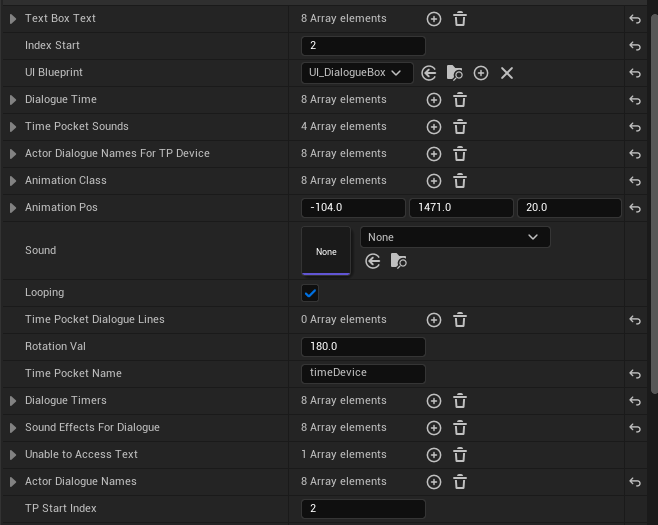
A full list of the time pocket options in-editor. This allows for quick and efficient iteration of time pockets in game, instead of having to create individual blueprints for each of the time pockets.
Pulling and Using Information from the Time Pocket
Once the time pocket actor is hit, it will get the values that were determined through the above options menu and then first have the animations set, and then have the values sent over to the dialogue box UI widget to play the dialogue text, name of character talking, and the sound effects played during the time pocket. These all run off an index value that, when advanced during gameplay via the dialogue box, can play different animations, sounds, and dialogue based off player input. The time pocket can also be delayed using an integer specified by the time pocket, since different time pockets have different points in their dialogue that the visual part shows up.
CHRONOLISTICS by 4terrabytes CHRIS BRUNS